Game guide
Tank Game Tips: How to Win Every Mission in Tank Battle Arena
Key takeaways
- Move sideways in every firefight: turret shots that landed dropped from 62% to 6%.
- Upgrade the cannon first. On the hardest missions it raised wins from 61 to 87 out of 100.
- Walls stop every shell and enemies only fire with a clear line, so fight around corners.
- Twelve missions hold 36 parts and all upgrades cost 27, so you can max everything.
The fastest way to win more tank battles is to keep moving sideways and spend your first parts on the cannon. Enemy shells are slow and aimed at where you are, not where you will be, so a tank that strafes takes a fraction of the hits. A stronger cannon then ends each fight before the damage piles up. We measured both in our own Tank Battle Arena, and the numbers below show how much each tip is worth.
How Tank Battle Arena works
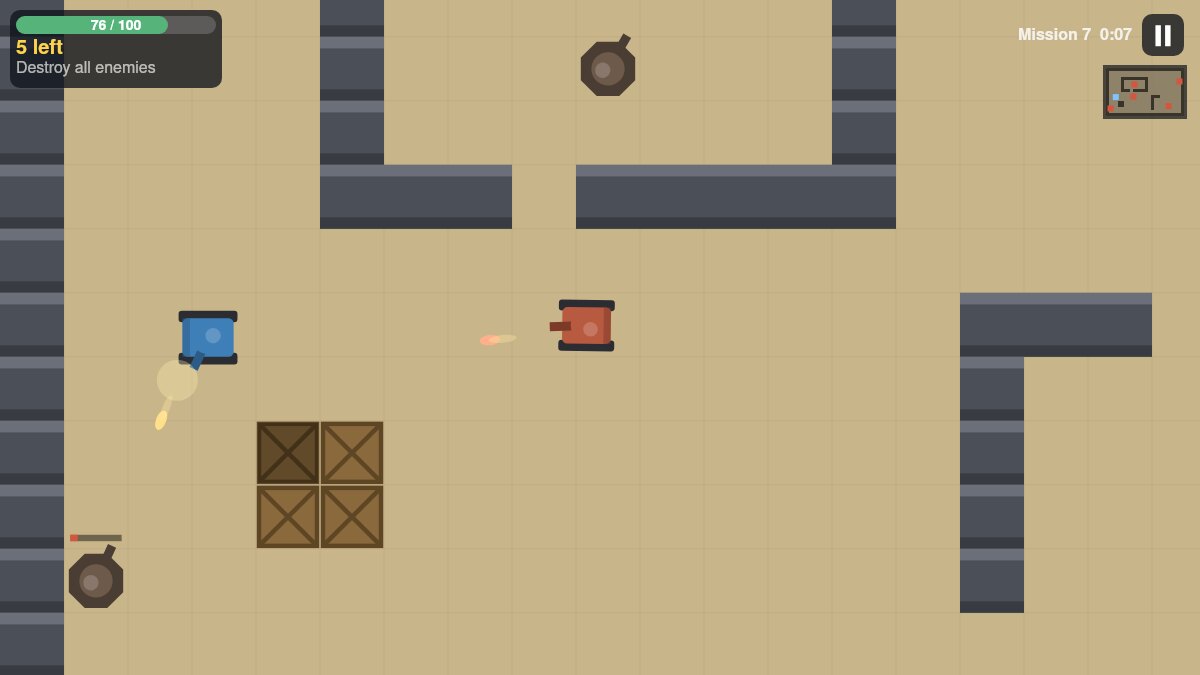
Tank Battle Arena is a top-down tank game with twelve short missions. You drive one tank through a walled arena while computer-controlled tanks and gun turrets shoot back. Each mission has one of three objectives:
- Destroy: knock out every enemy tank and turret on the map.
- Capture: stand inside each flag circle for four seconds. An enemy within three tiles of the flag blocks the capture.
- Defend: keep your base alive until the timer runs out while enemy tanks arrive in waves.
Your health at the end of a mission decides the stars: three stars above 70%, two above 35%, one for finishing at all. Every new star gives you one part, and parts buy upgrades in the garage. A mission takes one to two minutes when it goes well, so the whole game is a short session rather than a long campaign.
What we measured
We built the game, so we can test advice instead of guessing. A computer player that drives toward the objective, keeps its distance and fires when it has a clear line played every mission many times, always on the same maps and the same random seeds. Two experiments shaped the tips below.
The first one put a tank on open ground facing one enemy and counted how many enemy shells hit it, once standing still and once moving left and right.
| Enemy and distance | Standing still | Moving sideways |
|---|---|---|
| Gun turret, 4 tiles away | 97% | 9% |
| Gun turret, 7 tiles away | 62% | 6% |
| Light tank, 4 tiles away | 99% | 64% |
| Light tank, 7 tiles away | 99% | 67% |
A turret never moves, so sidestepping beats it almost completely. A light tank moves with you and lines its shots up again, so moving helps less, but it still saves you about a third of the damage.
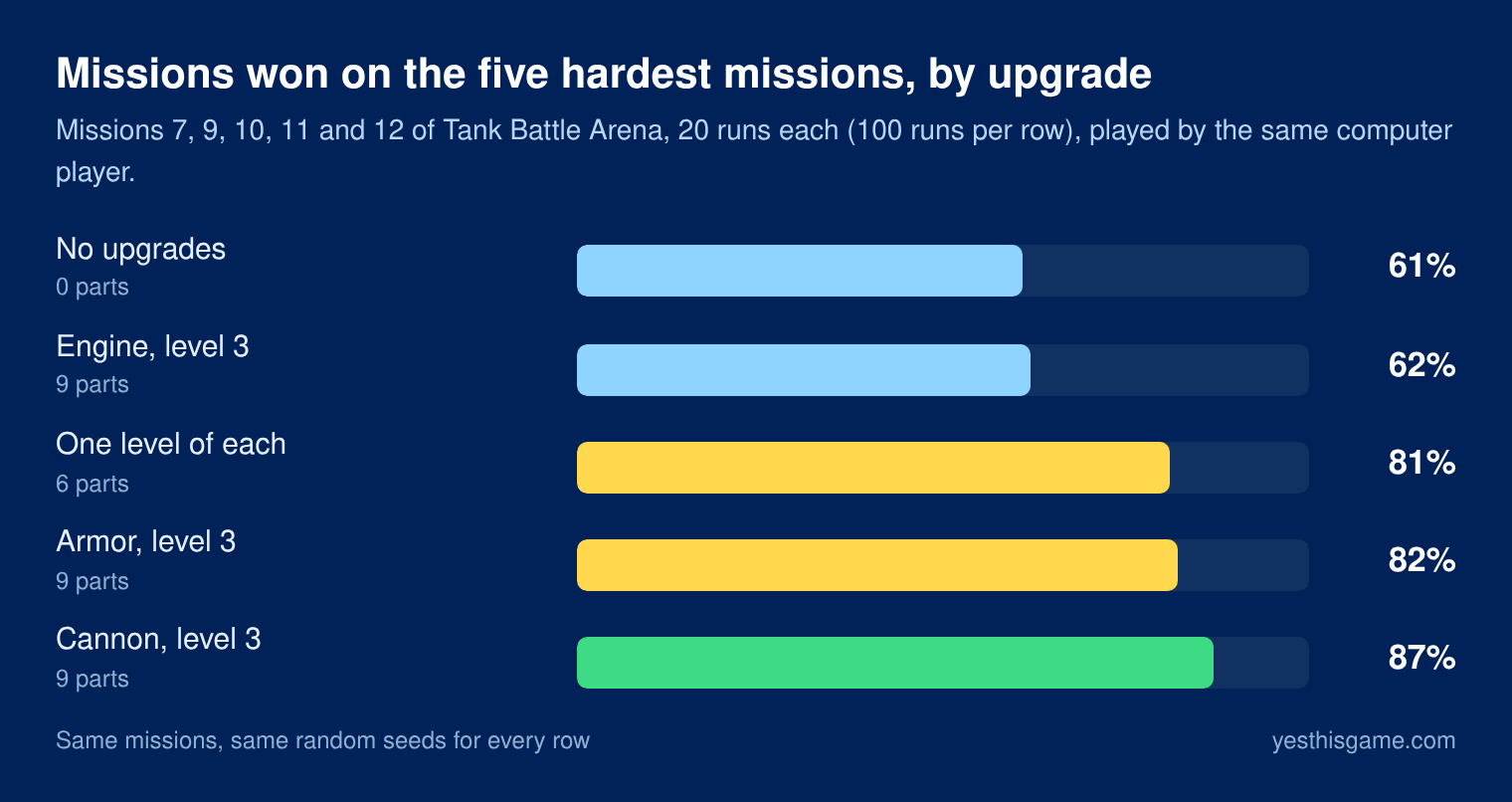
The second experiment ran the five hardest missions (7, 9, 10, 11 and 12) twenty times each with different upgrades and counted the wins.
8 tank game tips that hold up
1. Never stand still in a firefight
Enemy shells travel at 6.5 tiles per second and your tank drives at 5.2. A shell aimed at you from seven tiles away needs about a second to arrive, and in that second you can be four tiles to the side. Against turrets that was the difference between 62% and 6% of shots landing. Drive across the line of fire, not toward it or away from it.
2. Upgrade the cannon first
With the cannon at level 3 the computer player won 87 of 100 runs on the hardest missions, against 61 with no upgrades. Armor came close at 82, while a maxed engine changed almost nothing (62). The reason is simple: a stronger cannon shortens every fight, and a short fight is one in which fewer shells reach you.
| Enemy | Health | Shots, cannon level 0 | Shots, cannon level 3 |
|---|---|---|---|
| Light tank | 90 | 3 | 2 |
| Gun turret | 140 | 5 | 3 |
| Heavy tank | 240 | 8 | 4 |
Your cannon fires once every 0.8 seconds and does 30 damage, plus 10 per cannon level.
3. If you keep losing, buy armor next
Armor adds 30 health per level. It does not end fights faster, but it gives you room for mistakes, and on the defend missions it is what lets you stay next to the base while the waves arrive. One level of each upgrade (6 parts) won 81 of 100 runs, almost as many as a maxed armor (9 parts), so spreading parts early is not a mistake either.
4. Use corners: nothing shoots what it cannot see
Walls stop every shell, and enemies only fire when they have a clear line to you. Turrets have the longest reach (9 tiles) but cannot turn quickly. Drive to the edge of a wall, take a shot, roll back behind it while the turret reloads (about two seconds), and repeat.
5. Fight one tank at a time
Enemies notice you from 11 tiles away and keep chasing for about six seconds after they lose sight of you. Pull a light tank around a corner, away from its friends, and finish it there. Heavy tanks are slow (2.4 tiles per second against your 5.2), so you can always choose when to meet them.
6. Shoot the crates that block you
Wooden crates break after two hits. Walls never do. A crate between you and the objective is a path you have not opened yet, and a crate between you and a turret is cover you should keep.
7. Clear a flag before you stand on it
A capture only advances while no enemy is within three tiles of the flag. The circle turns red and the progress stops. Deal with the enemy first, then come back: every finished flag also repairs 25 health, so the order “clear, capture, heal” keeps you alive.
8. In defend missions, meet them early
Attackers go for your base first and only turn on you when you are within four tiles or have just hit them. That gives you free shots while they drive past. Meet each wave on its way in, and collect the repair kits that appear next to the base every 15 seconds.
Ready to try it? Play Tank Battle Arena in your browser. It runs on phones and computers, with nothing to download.
All 12 missions at a glance
The computer player had no upgrades in this table, ran each mission ten times, and the times are averages of its wins. A human with a little practice and a few upgrades does better on the late missions.
| Mission | Objective | Enemies | Wins without upgrades | Time |
|---|---|---|---|---|
| 1. First Patrol | Destroy | 3 light | 10 of 10 | 0:12 |
| 2. Two Flags | Capture 2 | 3 light | 10 of 10 | 0:16 |
| 3. Crossfire | Destroy | 3 light, 2 turrets | 10 of 10 | 0:25 |
| 4. Hold the Depot | Defend | Waves of light tanks | 10 of 10 | 1:00 |
| 5. Scrap Yard | Destroy | 5 light, 1 heavy, 1 turret | 8 of 10 | 0:28 |
| 6. Three Flags | Capture 3 | 3 light, 1 heavy | 10 of 10 | 0:31 |
| 7. Gun Nest | Destroy | 2 light, 1 heavy, 3 turrets | 6 of 10 | 0:31 |
| 8. Bridge Watch | Defend | Waves, heavy tanks after 30 s | 8 of 10 | 1:15 |
| 9. Back Alley | Destroy | 5 light, 2 heavy, 1 turret | 8 of 10 | 0:42 |
| 10. Flags Under Fire | Capture 3 | 2 light, 1 heavy, 2 turrets | 6 of 10 | 0:26 |
| 11. Iron Wall | Destroy | 3 light, 2 heavy, 3 turrets | 6 of 10 | 1:02 |
| 12. Last Stand | Defend | Waves, heavy tanks after 20 s | 2 of 10 | 1:30 |
Mission 12 is the real test: without upgrades the computer player held the base only twice in ten runs. Come back to it with the cannon and armor upgraded.
How to spend your parts
Each star you earn gives one part, once per mission, so the twelve missions hold 36 parts. Each upgrade has three levels costing 2, 3 and 4 parts, which makes 27 parts for everything. You can max all three upgrades with stars to spare, so the question is only the order.
- Cannon to level 1 after the first two missions (2 parts).
- Armor to level 1 before the first defend mission.
- Cannon to level 3 before Gun Nest, the mission with three turrets.
- Armor to level 3 before Last Stand.
- Engine last. It makes driving nicer but barely changes the result.
Replaying an early mission for a third star is the quickest way to get one more part when you are stuck.
Controls on phone and computer
- Phone and tablet: touch the left half of the screen and drag to drive. Touch the right half and drag to aim and fire, or just tap the right half to fire at the nearest enemy.
- Computer: WASD or the arrow keys drive, the mouse aims, a click or the space bar fires. P or Esc pauses, R restarts the mission and M mutes the sound.
- Auto-aim: if you do not aim, the turret turns to the nearest enemy it can see. Playing with the keyboard alone works because of it.
If the arrow keys scroll the page instead of moving the tank, click inside the game once. Our guide to arrow keys that scroll the page explains why.
Frequently asked questions
Which upgrade should I buy first in Tank Battle Arena?
The cannon. With the cannon at level 3 our test player won 87 of 100 runs on the five hardest missions, against 82 with maxed armor and 62 with a maxed engine.
How do I dodge enemy shells?
Drive across the line of fire. Enemy shells fly at 6.5 tiles per second and are aimed at where you are, so a tank moving sideways is usually somewhere else when they arrive.
How many missions are there?
Twelve: six destroy missions, three capture missions and three defend missions. Each takes one to two minutes.
How do I get more parts?
Each new star gives one part, once per mission. Replay an earlier mission and finish it with more health to earn the stars you missed.
Why does the flag stop capturing?
An enemy is within three tiles of the flag. Destroy it or lure it away, then go back to the flag.
Can I play Tank Battle Arena on a phone?
Yes. The left half of the screen is a stick for driving and the right half aims and fires. A quick tap on the right half fires at the nearest enemy.