Fix
Browser Game Not Loading? 9 Fixes, Tested on 51 Games
Key takeaways
- With WebGL switched off, 24 of 51 games refused to start; 19 started anyway, including all our own games.
- "Missing features: WebGL" or "Your browser does not support WebGL" means: turn on graphics acceleration.
- One blocked picture file was enough to leave a game on a black screen.
- Large 3D games download up to 96 MB before they start, so a slow loading bar may just need time.
When a browser game will not load, the cause is almost always one of three things: the browser cannot use the graphics card (WebGL), one of the game’s files was blocked, or a big download has not finished yet. We opened all 51 games on Yes This Game under broken conditions to see what each problem looks like. With WebGL switched off, 24 of them refused to start. One blocked picture file was enough to leave another one black. The fixes below follow that order.
Match what you see to the cause
| What you see | Most likely cause | Try first |
|---|---|---|
| “Software update needed” with “Missing features: WebGL” | No WebGL | Fix 2 |
| A pop-up saying “Your browser does not support WebGL” | No WebGL | Fix 2 |
| A black or empty square, no message | A blocked file or no WebGL | Fix 4, then Fix 2 |
| A loading bar that stops at a percentage | A large download, a blocked file or a slow connection | Fix 1 |
| The game worked yesterday, today it does not | A broken file in the browser cache | Fix 5 |
| The game runs, but slowly or in bursts | Graphics acceleration off, or too much running at once | If the game lags |
| The game runs, but the arrow keys scroll the page | The game does not have keyboard focus | Our guide to arrow keys |
What happened to 51 games with WebGL switched off
WebGL is the part of the browser that lets a web page draw with the graphics card. At least 34 of the 41 games on our site that we did not make ourselves use it. Our own ten games draw with the older 2D canvas and do not need it. To see what players experience when WebGL is missing, we opened every game in Chrome with WebGL disabled.
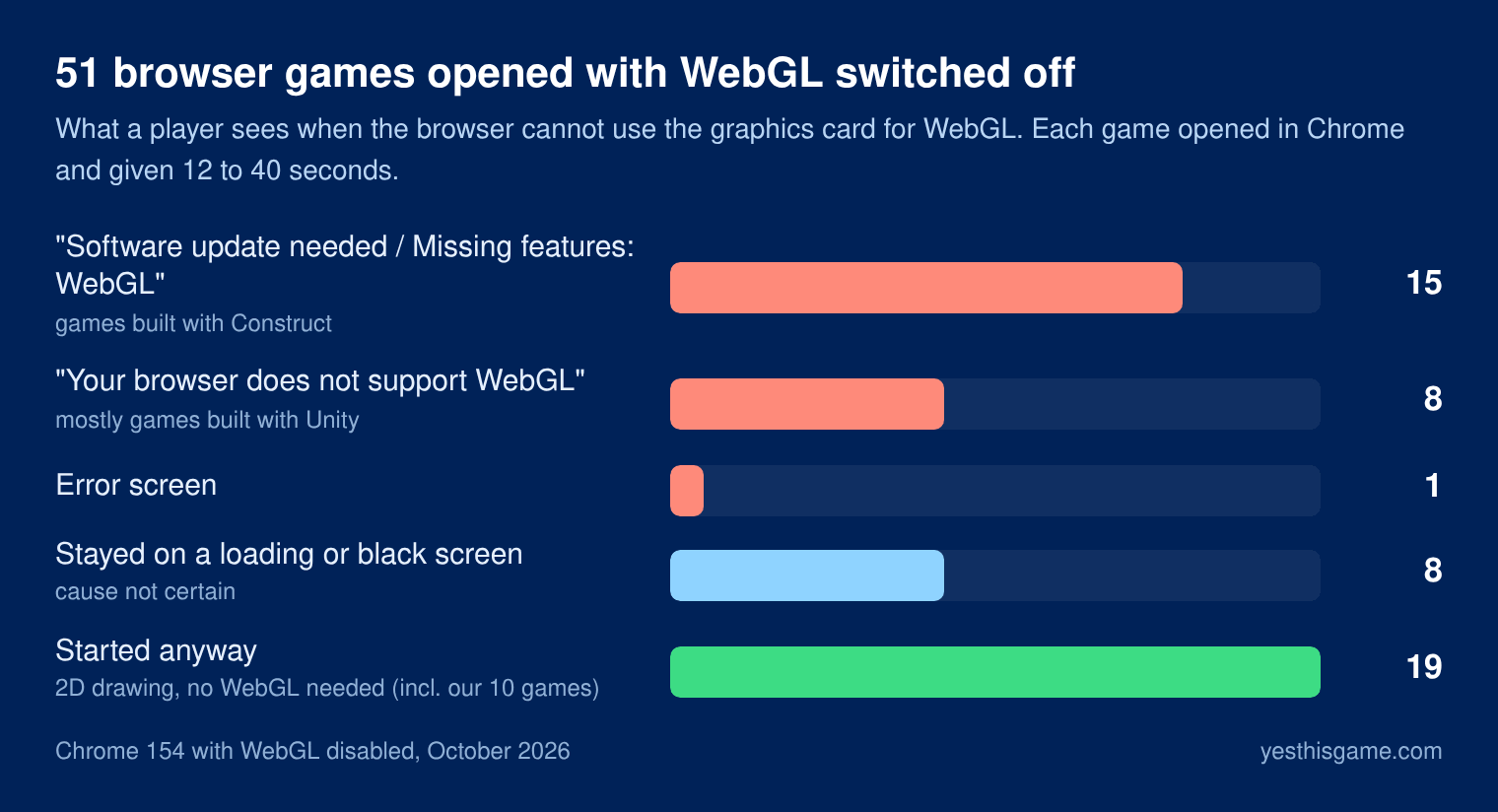
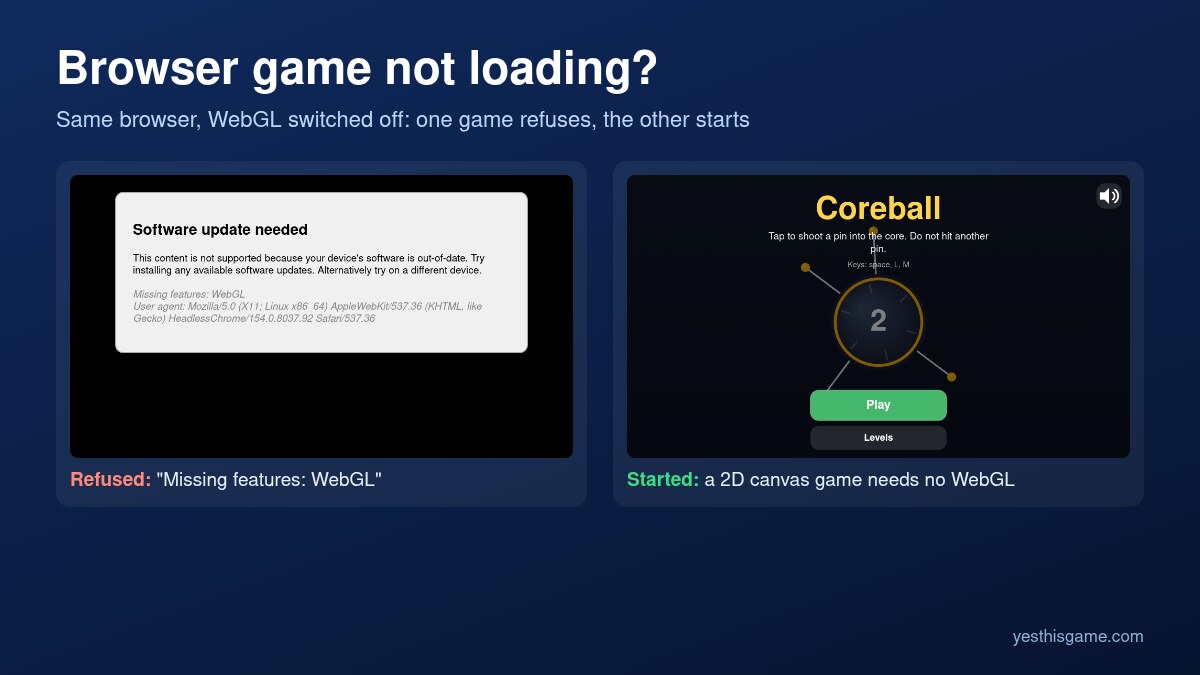
24 games did not start at all. Most of them said so clearly: games made with the Construct engine show “Software update needed” with “Missing features: WebGL” in small print, and games made with Unity open a pop-up or show a line saying “Your browser does not support WebGL”. Eight more stayed on a loading bar or a black screen. Nineteen started anyway, either because they never needed WebGL or because they fall back to the 2D canvas.
This matters more now than a few years ago. Chrome used to switch to a slow software version of WebGL when it could not use the graphics card. That fallback is being removed: in Google’s words, WebGL context creation will fail instead of falling back. On a computer where Chrome cannot use the graphics card, a WebGL game now simply does not start.
9 fixes, in the order to try them
1. Give a big game time, and check its size
Browser games download everything before they start. In our measurements most 2D games were 1 to 5 MB, but large 3D games reached 50 to 96 MB, and some of them only start that big download after you press Play. On a 5 Mbit/s connection 96 MB takes about two and a half minutes. If the loading bar is still moving, wait. Our article on how much data browser games use has the sizes and download times.
2. Turn on graphics acceleration
This is the fix for every WebGL message above. In Chrome open Settings → System, switch on “Use graphics acceleration when available” and press Relaunch. In Microsoft Edge the same switch is under Settings → System and performance. In Firefox it is under Settings → General → Performance: untick “Use recommended performance settings”, then tick “Use hardware acceleration when available”.
To check the result, visit get.webgl.org: you should see a spinning cube. In Chrome you can also type chrome://gpu in the address bar; the line for WebGL should say “Hardware accelerated”.
3. Update the browser and the graphics driver
If graphics acceleration is on and WebGL still fails, the browser may have blocked your graphics card because its driver is too old or known to crash. Update the browser first (Chrome: Settings → About Chrome), then the graphics driver from Windows Update or from the maker of your computer. On a work or school computer an administrator may have switched graphics acceleration off on purpose; then this is not something you can change.
4. Switch off extensions for the game’s site
Ad blockers and privacy extensions work from long lists of address patterns. A broad rule can catch a file the game needs. In our test a blocking rule that matched the word “facebook” anywhere in an address stopped one of our games completely: one of its picture files happened to have “facebook” in its name, the file was blocked, and the game stayed black. Without the rule it started normally. Turn the extension off for the game’s site, or open the game in a window without extensions, and reload.
5. Do a hard reload, then clear the site’s data
A file that was cut off during an earlier visit can stay in the browser’s cache and break the game every time. Press Ctrl+Shift+R (on a Mac Cmd+Shift+R) to reload without the cache. If that does not help, clear the data of that one site: click the icon left of the address, open the site settings and clear its data. Be aware that this also deletes the game’s saved progress on that device.
6. Close other tabs and programs
A large 3D game unpacks its data in memory, and the biggest ones on our site carry more than 100 MB of it. On a computer with little memory, a game can stop halfway through loading when the browser runs short. Close heavy tabs, especially video, and try again.
7. Check the network you are on
School, office and public Wi-Fi networks often filter websites. A filter can let the game page through and block the server the game files come from, which looks exactly like a game that never finishes loading. Try the same game on a different connection, such as a phone hotspot, to tell the two apart.
8. Try another browser or device
If the game works in another browser on the same computer, the problem is a setting or an extension in the first one. If it fails on every browser and every device, the game itself is broken.
9. Tell the site
Games break on their own too: files move, a server that hosted part of a game disappears. The people who run the site cannot fix what they do not know about. Our contact page reaches us directly.
Want games that start on almost any computer? The games we make ourselves draw with the 2D canvas, need no WebGL and download 13 to 26 KB each.
If the game loads but lags
- Graphics acceleration off: a game that falls back to drawing everything on the processor can become many times slower. Fix 2 applies here too.
- Battery saver: laptops and phones slow the processor down to save power. Plug in or switch the power mode to balanced or best performance.
- Too much at once: a video in another tab, a video call or a big download all compete with the game.
- A smaller window: many games draw as many pixels as the window has. A smaller window, or leaving fullscreen on a very large screen, can make a heavy game smoother.
- Background tabs: browsers slow down tabs you are not looking at. A game in a tab you just switched back to may need a moment.
How we tested
We used Chrome 154 on Linux and opened the game frame of each of the 51 games on Yes This Game, as of October 2026. For the WebGL test, WebGL was disabled with Chrome’s own switches, each game was given 12 seconds and a click, and the ones that did not finish were tried again with 40 seconds and a check for pop-up messages. For the blocking test we opened the same game with and without one blocking rule. The download sizes come from the browser’s network log, counted as compressed bytes.
Frequently asked questions
Why does a browser game show a black screen?
Usually the browser cannot use WebGL, or one of the game’s files was blocked. Turn on graphics acceleration, then switch off ad blockers for the site and reload.
What does "Missing features: WebGL" mean?
The game needs WebGL, which lets a web page draw with the graphics card, and the browser cannot provide it. Turn on “Use graphics acceleration when available” in the browser settings and relaunch.
How do I fix "Your browser does not support WebGL"?
Turn on graphics acceleration, update the browser and the graphics driver, and check the result at get.webgl.org. On a managed work or school computer it may be switched off by an administrator.
Why is my game stuck on the loading screen?
Large games download up to about 100 MB first, and some start that download only after you press Play. If the bar still moves, wait. If it stops, try a hard reload with Ctrl+Shift+R and switch off blockers for the site.
Can an ad blocker stop a game from loading?
Yes. In our test one broad blocking rule caught a picture file the game needed, and the game stayed black. Without the rule it loaded normally.
Will clearing the browser data delete my progress?
Yes. Most browser games save progress in the browser, so clearing a site’s data resets it on that device. Try a hard reload first.