Explainer
Are Free Online Games Safe? A 7-Point Checklist, Tested on 28 Games

Key takeaways
- A browser game runs in a sandbox: it cannot read your files or install software.
- The real risks are around the game: download prompts, permission requests, pop-ups and ads that look like buttons.
- In our test of 28 games, none asked for a permission, opened a pop-up or started a download.
- 25 of the 28 contacted no other server; the other 3 only reached the Unity engine's analytics service.
Free online games that run in your browser are generally safe: the browser keeps a game in a sandbox where it cannot read your files or install anything without your say. The risks come from the site around the game, such as fake download buttons, permission prompts and pop-ups, and you can spot them with seven quick checks. To see what a game really does, we opened 28 games on Yes This Game in a test browser and recorded every request, prompt and new window. None of them asked for a permission, opened a pop-up or started a download, and 25 of the 28 contacted no server other than our own.
The short answer
A game that plays in a browser tab is a web page. Like any web page, it can show pictures, play sound and store small amounts of data for itself, such as your saved levels. It cannot open the files on your computer, see your other tabs or install software. That is why a browser game is a safer choice than downloading a game from an unknown site.
What can still go wrong has almost nothing to do with the game itself:
- a site asks you to download something “to play”;
- a site asks for permissions it does not need, such as notifications or your location;
- pop-ups or new tabs open by themselves;
- ads that look like buttons (“Play”, “Download”, “Continue”) lead somewhere else;
- a sign-up form asks for more personal data than a game could need.
The 7-point checklist
1. The address starts with https and shows a padlock
The connection to the site is encrypted, so nobody on your network can change the game or read what you send. Every page and every game file on Yes This Game is served over https.
2. You never have to download or install anything
A browser game starts in the page. If a site says you need to download a file, an “installer” or a “player” to start a free online game, close the tab. In our test, none of the 28 games started a download.
3. No sign-up needed to play
Free browser games rarely need an account. If a game asks for an email address, a phone number or a password before you can play, ask yourself why. Yes This Game has no accounts at all: progress is kept in your own browser.
4. No permission prompts
A game does not need to send you notifications, know your location or use your camera or microphone. If a prompt appears, choose Block. You can still play. In our test, none of the 28 games asked for any of these.
5. No pop-ups or tabs that open by themselves
A click inside a game should not open a new window. Browsers block most pop-ups, but some sites try anyway. In our test, none of the 28 games tried to open a new window.
6. Ads are clearly separate from the game
Free sites pay for themselves with ads. That is normal, but an ad should look like an ad. Be careful with big green “Download” or “Play now” buttons that are not part of the game: they often belong to an ad. On Yes This Game, Google ads appear around the game area, outside the game frame; the game’s own buttons are always inside the frame.
7. Check what the game connects to
This is the check most people never do, and it tells you the most. A game that only loads files from the site you are on keeps your visit between you and that site. A game that contacts many other servers may be loading ad networks or trackers inside the game itself.
You can see it yourself: open the game, press F12 (or right-click and choose Inspect), open the Network tab, reload the page and look at the domain of each request.
What we found in 28 games
We loaded each game on its own, clicked once to start it, played for about 40 seconds and recorded every request the game made to a server other than yesthisgame.com, every permission prompt, every attempt to open a new window and every download. Ad networks were blocked in the test browser, but an attempt to reach them still counted.
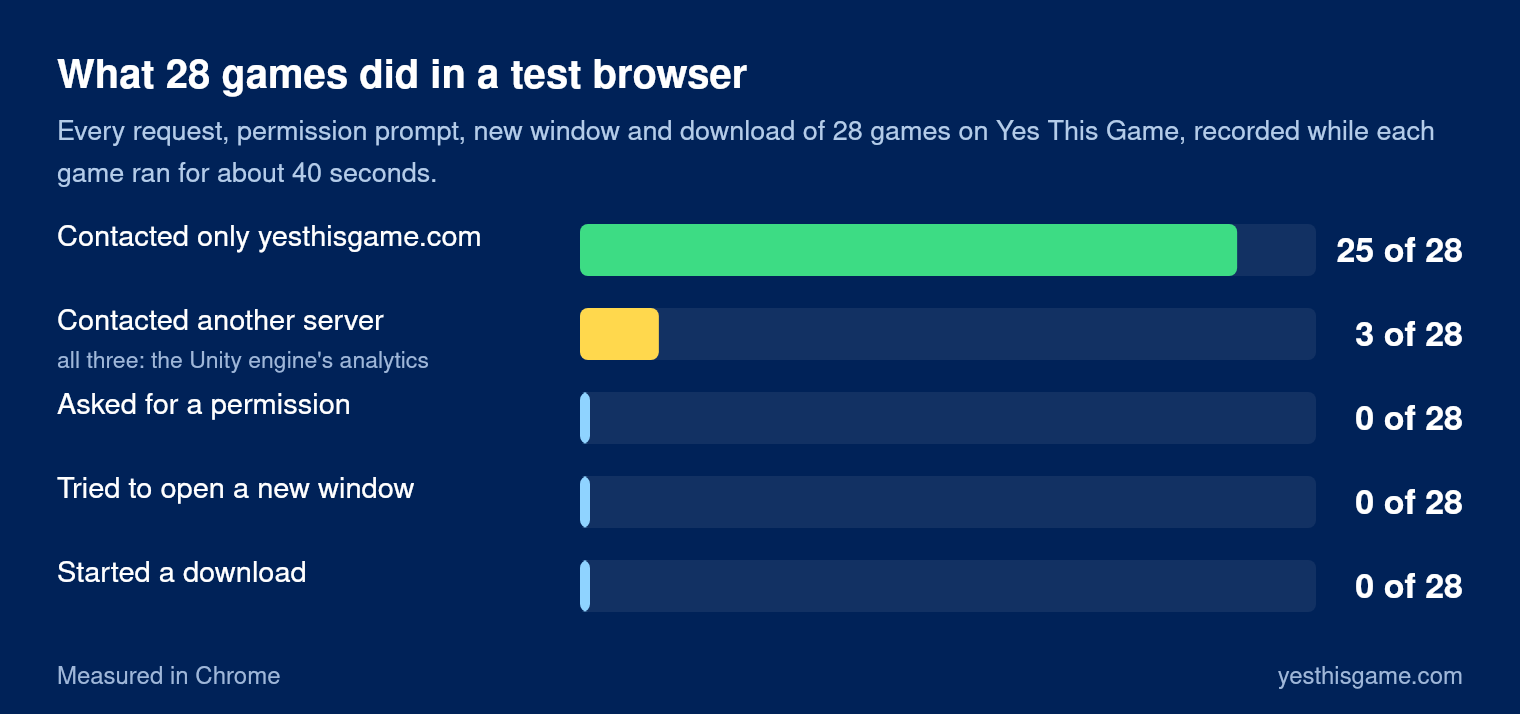
| What we checked | Games |
|---|---|
| Started a download | 0 of 28 |
| Asked for notifications, location, camera or microphone | 0 of 28 |
| Tried to open a new window | 0 of 28 |
| Contacted a server other than yesthisgame.com | 3 of 28 |
The three games that contacted another server were all made with the Unity game engine, and both addresses they called, cdp.cloud.unity3d.com and config.uca.cloud.unity3d.com, belong to Unity’s own analytics service, which reports how the engine is running. None of the 28 games loaded an ad network or a tracker inside the game. Our own games, such as Seat Jam and the retro games like Contra, load only files from our own site.
Three browser settings that help
- Keep your browser up to date. Updates close security holes, and browsers update themselves if you restart them now and then.
- Block notification requests by default. In Chrome and Edge: Settings, Privacy and security, Site settings, Notifications, “Don’t allow sites to send notifications”. Firefox has the same under Permissions.
- Be careful with extensions. A browser extension can read every page you visit. Install only the ones you really need, from the official store.
Red flags at a glance
| What you see | What to do |
|---|---|
| “Download to play” or a file starts downloading | Close the tab and delete the file |
| “Allow notifications to continue” | Click Block; a game never needs it |
| New tabs opening on every click | Leave the site |
| A sign-up form before you can play | Play somewhere that does not ask |
| “Your device is infected” or prize messages | Close the tab; it is an ad or a scam, never a game |
Frequently asked questions
Are free online games safe?
Games that run in your browser are generally safe: the browser keeps them in a sandbox where they cannot read your files or install software. The risks come from the site around the game, such as download prompts, permission requests, pop-ups and misleading ads.
Can a browser game give my computer a virus?
A game that runs in a browser tab cannot install software on its own. The danger is a site that asks you to download and run a file. Never download an installer to play a free online game.
Should I allow notifications on a game site?
No. A game does not need notifications, your location, your camera or your microphone. Click Block; the game still works.
How can I see what a game connects to?
Press F12 or right-click and choose Inspect, open the Network tab and reload the page. The domain of each request shows which servers the game talks to.
Do I need an account to play free online games?
Usually not. On Yes This Game there are no accounts; progress is saved in your own browser.