Measured
Best Browser Games for Old or Slow Laptops: We Measured 28 Games

Key takeaways
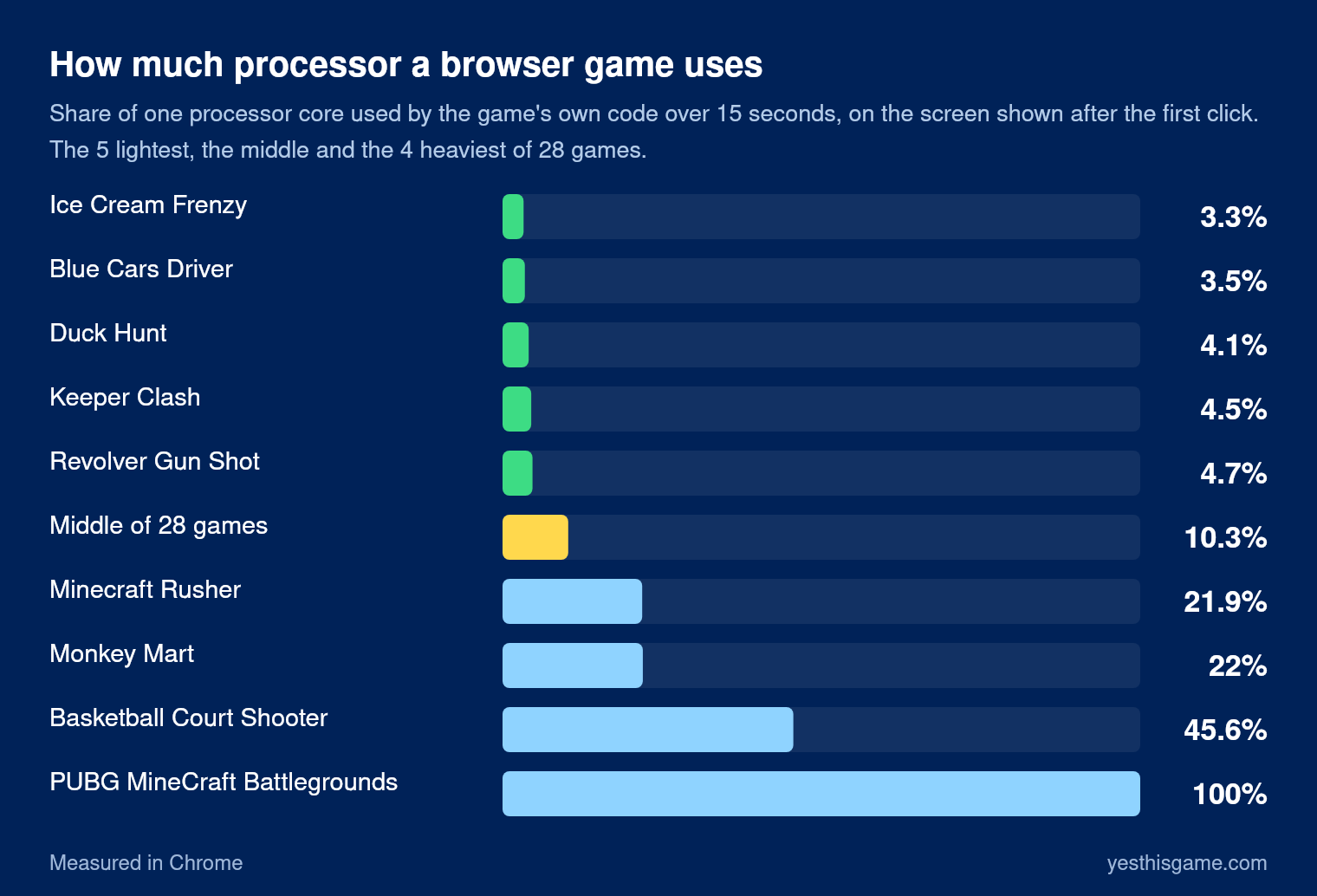
- The lightest of 28 games used only 3 to 7% of one processor core; the middle game about 10%.
- The heaviest, a 3D shooter, kept a whole core busy; 3D games made with Unity were the heaviest overall.
- Download size says little: Duck Hunt downloads 29 MB but used only 4% of the processor.
- Closing other tabs and keeping hardware acceleration on help an old laptop most.
The best browser games for an old or slow laptop are the ones that do little work between your moves: turn-based puzzles and simple 2D games. In our measurements of 28 games, the lightest used only 3 to 7% of one processor core, while the heaviest, a 3D shooter, kept a whole core busy. We loaded 28 games on Yes This Game in a test browser and recorded how much of the processor and memory it used on the screen it shows after the first click. Here are the lightest games, the heaviest kinds, and the settings that help most on an older computer.
How we measured
Each game was loaded on its own in Chrome, clicked once to start, and then left running for 15 seconds while we read two numbers:
- Processor: how much of one processor core the game’s own code kept busy. 10% means the game used a tenth of one core.
- Memory: how much memory the browser needed for the game on top of an empty page. An empty tab already took 275 MB in our test browser.
We also recorded how much the game downloaded. The test machine draws all graphics in software, without a graphics card, so the numbers are best read as a ranking: a game that is light here will be light on your laptop too.
The lightest games
| Game | Kind | Processor | Download |
|---|---|---|---|
| Ice Cream Frenzy | Match 3 | 3.3% | 1.8 MB |
| Blue Cars Driver | Driving | 3.5% | 9.8 MB |
| Duck Hunt | Shooting | 4.1% | 29 MB |
| Keeper Clash | Sports | 4.5% | 2.6 MB |
| Revolver Gun Shot | Shooting | 4.7% | 1.1 MB |
| Cars Lightning Racing Speed | Racing | 5.1% | 11.7 MB |
| Vegetables Crush | Puzzle | 5.9% | 1.8 MB |
| Find The Color | Puzzle | 6.2% | 1.9 MB |
| Angry Birds Heroes | Puzzle | 6.3% | 13.9 MB |
| Head Soccer 2024 | Sports | 6.9% | 13 MB |
The middle of all 28 games was about 10% of one core. Our own puzzle Seat Jam used almost nothing at all, because it only redraws the screen when you make a move.
What makes a game heavy
The heaviest game in our test, PUBG MineCraft Battlegrounds, kept a whole processor core busy. Basketball Court Shooter used 46% of a core and needed about 1 GB more memory than an empty tab. Both are 3D games made with the Unity engine, which draws a complete 3D scene 60 times a second. Busy 2D games such as Monkey Mart and Minecraft Rusher used about 22%.
Download size says little about how heavy a game is. Duck Hunt downloads 29 MB, mostly pictures and sound, but used only 4% of the processor. What makes a game heavy is how much it draws and calculates every second: 3D first, then fast action, then puzzles that wait for you.
7 ways to make browser games run better on an old laptop
1. Close the other tabs
Every open tab keeps some memory, and tabs with video or ads keep the processor busy too. With 4 GB of memory or less, this is the single biggest help.
2. Keep hardware acceleration on
Browsers use the graphics chip to draw games when they can. In Chrome and Edge check Settings, System, “Use graphics acceleration when available”. Turning it off moves all drawing to the processor, which is exactly what makes old laptops struggle.
3. Plug in the charger
On battery many laptops slow the processor down to save power. Plugged in, or with the power mode set to “Best performance”, the same game runs smoother.
4. Play in a smaller window
Full screen means more pixels to draw every frame. If a game stutters, try it in a normal window first.
5. Prefer games that wait for you
Puzzle games that only change when you make a move hardly use the processor at all. Racing and shooting games redraw the whole screen 60 times a second.
6. Give the first load a moment
A game downloads its files once. The first start is the slowest; after that most of it comes from the browser’s cache.
7. Update the browser
New browser versions run the same game code faster. An old browser on an old laptop is the slowest combination.
Frequently asked questions
What browser games run on an old laptop?
Puzzle games and simple 2D games. In our measurements the lightest games, such as Ice Cream Frenzy, Vegetables Crush and Find The Color, used 3 to 7% of one processor core.
Why do some browser games lag on my laptop?
3D games redraw a full scene 60 times a second. In our test the heaviest 3D game kept a whole processor core busy. Close other tabs, plug in the charger and keep hardware acceleration on.
Does a bigger download mean a heavier game?
No. Duck Hunt downloads 29 MB but used only 4% of the processor. How much a game draws every second matters more than its size.
Should I turn hardware acceleration on or off?
On. It lets the browser draw games with the graphics chip. Turning it off moves all drawing to the processor.
How much memory do browser games need?
In our test browser an empty tab took 275 MB, and most games needed a few hundred MB more. Big 3D games needed about 1 GB more.