Fix
No Sound in a Browser Game? 6 Fixes, in the Order to Try Them
Key takeaways
- Most silent browser games are fixed in seconds: switch on the game's own sound button, then click once inside the game.
- Browsers keep a page's sound paused until you interact with it; Chrome has done this for game audio since version 71.
- A speaker with a line through it on the tab means the tab is muted: right-click the tab and choose Unmute site.
- If no site has sound, videos included, the cause is the computer: the volume mixer or the device the sound goes to.
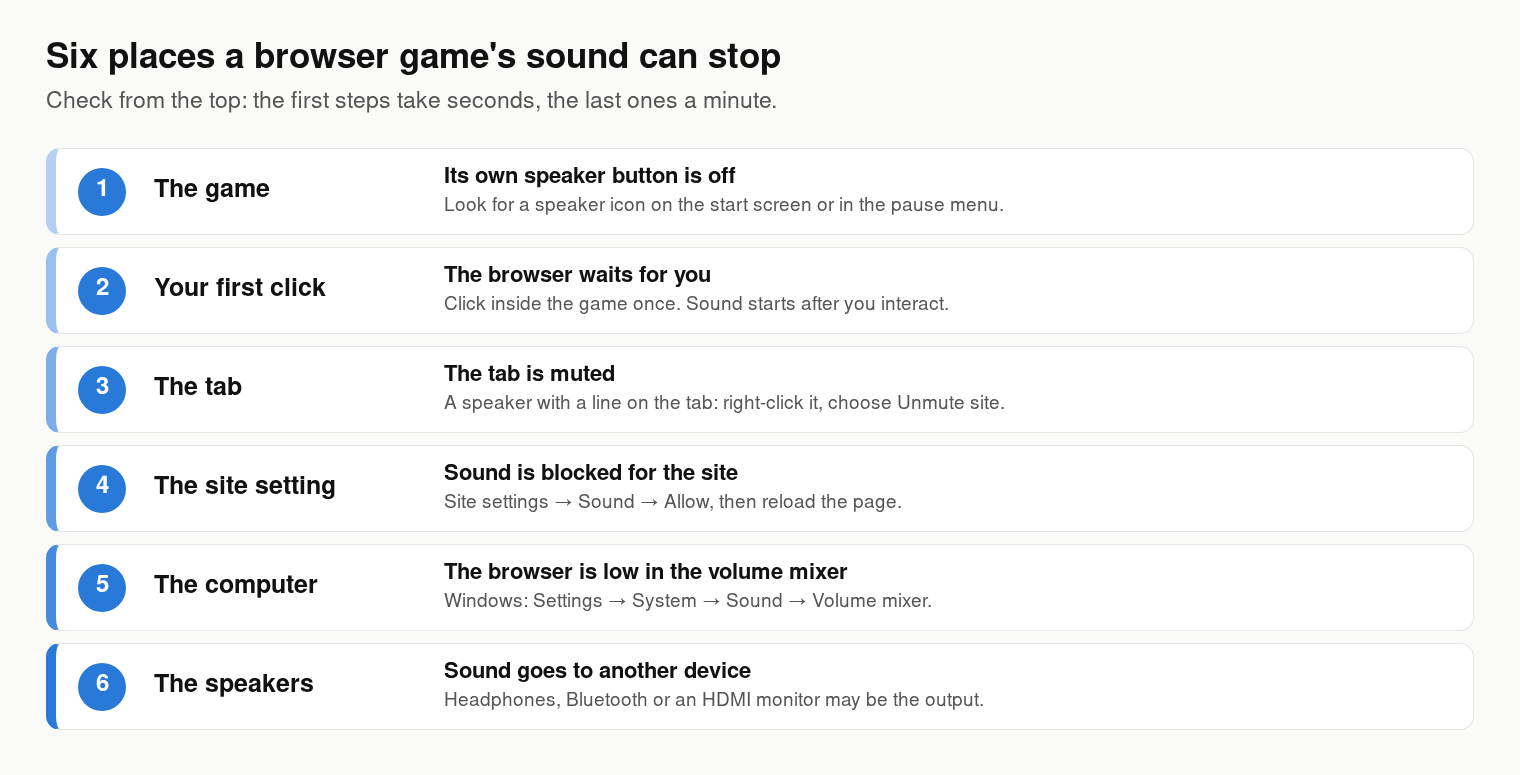
A browser game with no sound is almost never broken. The sound is switched off in one of six places: the game’s own speaker button, the browser waiting for your first click, a muted tab, the site’s sound setting, the computer’s volume mixer or the device the sound goes to. Check them in that order. The first two take a few seconds and solve most cases; the last ones take about a minute each.
Match what you hear to the cause
| What you notice | Most likely cause | Fix |
|---|---|---|
| This game is silent, other sites play sound | The game’s sound button, or no click yet | Fixes 1 and 2 |
| A speaker with a line through it on the tab | The tab is muted | Fix 3 |
| Silent on this site only, even after a reload | Sound is blocked for the site | Fix 4 |
| No sound anywhere, videos too | The computer’s volume or output device | Fixes 5 and 6 |
6 fixes, in the order to try them
1. Switch on the game’s own sound
Many games, including many of ours, have their own speaker or music button: on the start screen, in the settings or behind the pause button. Some games have two, one for music and one for effects. If it is off, nothing else on this page will help, and some games remember the choice the next time you open them. Look for a speaker or a note with a line through it and click it.
2. Click inside the game once
Browsers do not let a page start playing sound on its own. A game’s sound stays paused until you interact with the page, and Chrome has applied this rule to game audio since version 71, as its autoplay policy explains. A well-made game starts its sound as soon as you click. So click or tap inside the game area itself, not only on the page around it, and give it a second.
3. Unmute the tab
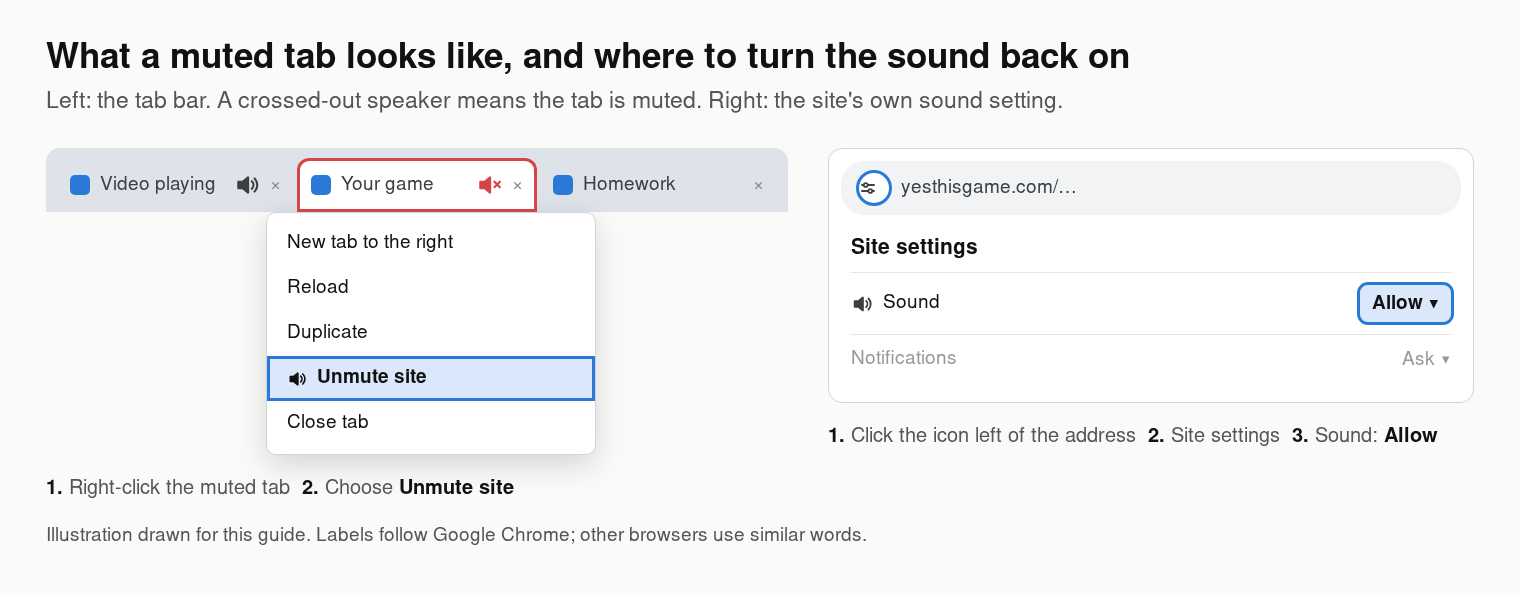
Look at the tab. A tab that is playing sound shows a small speaker; a muted tab shows the speaker with a line through it. In Chrome, right-click the tab and choose Unmute site. Edge and Firefox have the same option on the tab’s right-click menu. A muted site stays muted in every new tab until you unmute it, which is why one game can be silent day after day.
4. Allow sound for the site
Chrome also keeps a sound setting for each site. Click the icon at the left of the address bar, open Site settings and set Sound to Allow, then reload the page. To see every site you have blocked, type chrome://settings/content/sound into the address bar and check that yesthisgame.com is not in the list of sites not allowed to play sound.
5. Check the volume mixer
Windows keeps a separate volume for each app, so the browser can be silent while everything else plays. In Windows 11 open Settings → System → Sound → Volume mixer and check the slider and the mute button next to your browser. In Windows 10, right-click the speaker icon in the taskbar and choose Open Volume mixer. On a Chromebook, open Quick Settings at the bottom right and check the volume slider.
6. Check where the sound goes
The sound may be playing perfectly, just somewhere else: in headphones that are still plugged in, in Bluetooth earbuds in another room, or in a monitor or TV connected with HDMI that has no speakers. In Windows 11, press Windows + A, click the arrow next to the volume slider and pick the speakers you want. On a Chromebook, the same arrow is next to the volume slider in Quick Settings.
On a phone or tablet
On an iPhone or iPad, check silent mode first: web games often stay quiet while the phone is set to silent with the side switch or the Action button. On Android, the volume buttons change the ringer until a sound starts playing, so open the volume panel and raise the media volume. Bluetooth headphones paired with the phone are the next thing to check.
Still silent?
- Try another game with sound. Car Drift Racer 2027 and Coreball both have sound. If they work, the silent game may simply have no sound of its own, which is common for coloring and puzzle games.
- Close the browser completely and open it again, then update it. An audio device that was connected while the browser was open is sometimes only picked up after a restart.
- Try a second browser. If the game has sound in Edge but not in Chrome, the cause is a setting or an extension in Chrome; open the game in a window without extensions to check.
- If the game does not start at all, that is a different problem: our guide to a browser game not loading covers it, and the arrow keys guide fixes a game that scrolls the page instead of moving.
How we wrote this
The order follows where sound can be stopped on its way out: the game, the page, the tab, the site setting, the operating system and the speakers. The rule about the first click comes from Chrome’s published autoplay policy; the menu names come from current versions of Chrome and Windows 11, and other browsers use similar words. The illustrations were drawn for this guide.
Frequently asked questions
Why does a browser game have no sound until I click?
Browsers do not let a page start sound on its own. The game’s audio stays paused until you click, tap or press a key on the page; then a well-made game starts its sound.
How do I unmute a tab in Chrome?
Right-click the tab and choose Unmute site. A muted tab shows a speaker with a line through it.
How do I allow sound for a website in Chrome?
Click the icon at the left of the address bar, open Site settings and set Sound to Allow, then reload the page. All blocked sites are listed at chrome://settings/content/sound.
Why is there no sound in games on my Chromebook?
Check the volume slider and the output arrow in Quick Settings, then the tab and the site’s sound setting in Chrome, and click once inside the game.
Why is a web game silent on my iPhone?
Web games often stay quiet while the iPhone is in silent mode. Turn silent mode off with the side switch or the Action button and raise the volume.