Measured
How to Play Arcade Games in Your Browser: Coins, Controls and Save States
Key takeaways
- An emulator rebuilds the old machine in JavaScript and WebAssembly, so the original game runs in a normal browser tab.
- First visit: 2.4 to 3.4 MB for Mega Drive games, 11.5 to 14 MB for arcade machines; a second visit downloaded 0 MB.
- Arcade games still need a coin: press V (or Coin on a phone), then Start, after the start-up screen.
- Save states freeze the whole machine at any moment, something the original arcades never offered.
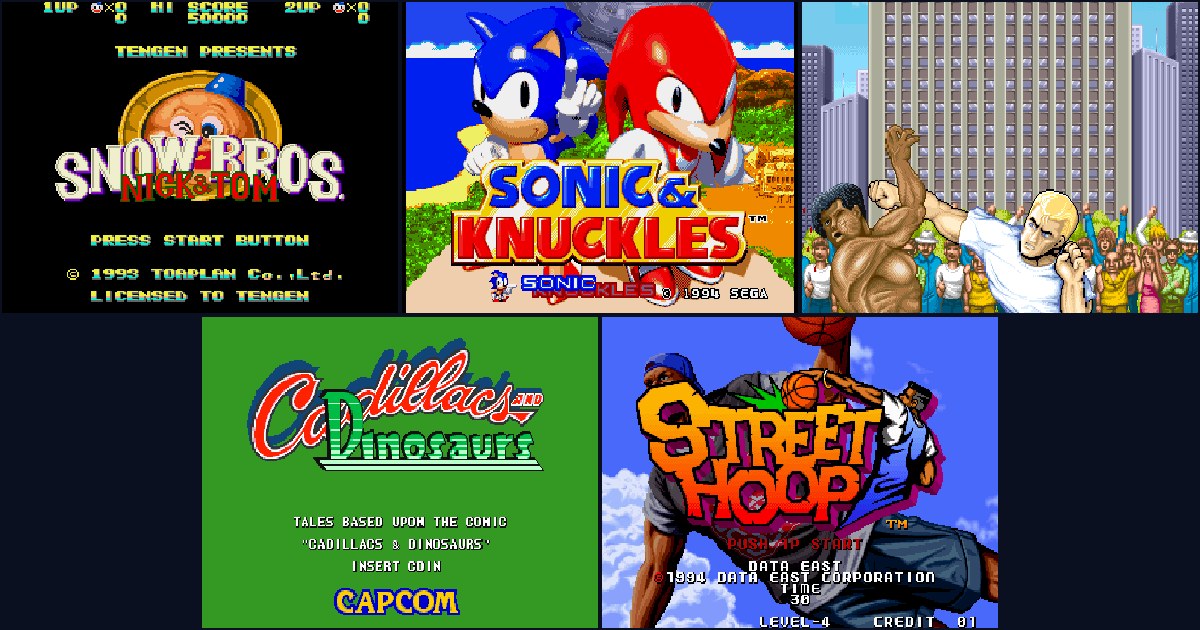
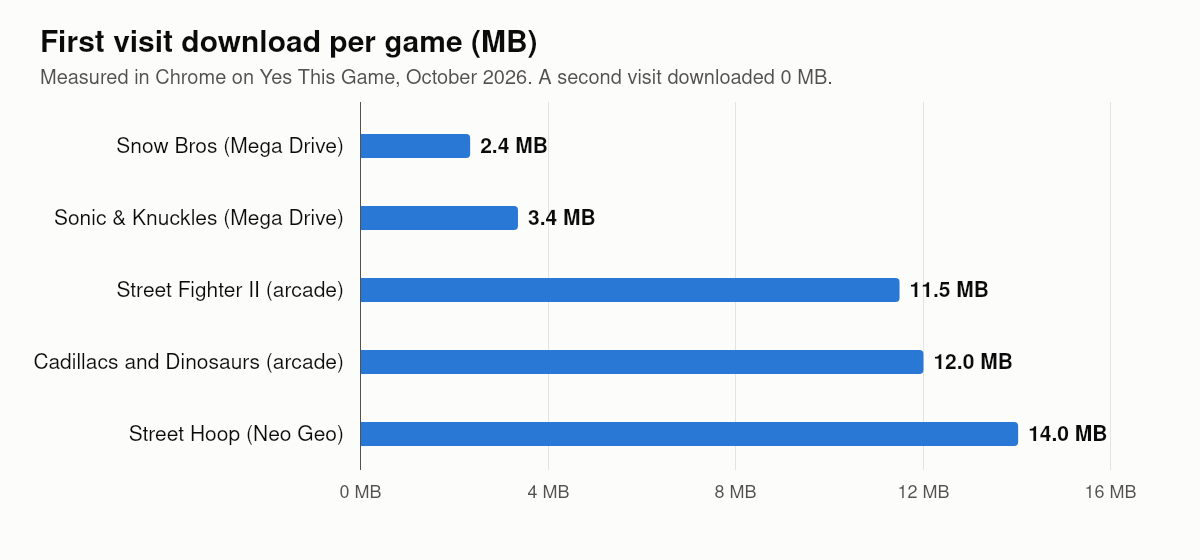
You can play classic arcade and console games in a normal browser tab: an emulator rebuilds the old machine in JavaScript and WebAssembly, and the game runs inside it. No download, no install and no account. What surprises most people is the arcade part: you still have to insert a coin, the machine still runs its start-up checks, and the first visit downloads a few megabytes. We measured our five retro games in Chrome: the Mega Drive games need 2 to 3.5 MB, the arcade machines 11.5 to 14 MB, and a second visit downloads nothing at all.
How an arcade game runs in a browser
An old game is two things: the program that ran on the machine, and the machine itself. The program is a small file, often just a few megabytes, copied from the original cartridge or circuit board. The machine is rebuilt by an emulator: software that behaves like the old processor, graphics chip and sound chip, so the original program runs as if it were on the real hardware.
In a browser, the emulator is written in JavaScript and WebAssembly, a fast format that browsers run almost at the speed of normal programs. On Yes This Game the emulator is EmulatorJS, an open-source project, with a separate “core” for each kind of machine: one for the Sega Mega Drive and one for arcade boards such as Capcom’s CPS-1 and SNK’s Neo Geo.
How much a retro game downloads
| Game | Machine | Emulator core | Game file | Total first visit |
|---|---|---|---|---|
| Snow Bros | Mega Drive | 1.2 MB | 1.0 MB | 2.4 MB |
| Sonic & Knuckles | Mega Drive | 1.2 MB | 2.0 MB | 3.4 MB |
| Street Fighter II | Capcom CPS-1 | 7.9 MB | 3.4 MB | 11.5 MB |
| Cadillacs and Dinosaurs | Capcom CPS-1 | 7.9 MB | 3.9 MB | 12.0 MB |
| Street Hoop | Neo Geo | 7.9 MB | 4.5 MB + 1.4 MB start-up file | 14.0 MB |
The rest of each total is the emulator’s own interface, about 0.2 MB. Two things stand out. First, the core is the biggest part for arcade games: the arcade emulator has to know hundreds of different boards, so it is about seven times bigger than the Mega Drive one. Second, the second visit downloaded 0 MB: the emulator keeps the core and the game file in the browser’s storage, so a game you have played before starts without downloading anything. And once one arcade game has loaded, the next one only needs its own game file.
For comparison, many modern 3D browser games download 50 to 85 MB before they start, which we measured in our test of 51 browser games.
Insert coin: how to start an arcade game
Console games such as Sonic start like they did at home: press Start. Arcade games are the real coin-operated machines, so they behave like one:
- Wait for the start-up. An arcade board first checks its memory and shows a warning or logo screen. Coins pressed during this moment are ignored, exactly as on the real cabinet.
- Insert a coin. On our pages that is the V key, or the Coin button on a phone. The screen shows CREDIT 1.
- Press Start (Enter, or the Start button on a phone) and choose your character.
- Continue for free. When you lose, insert another coin and press Start before the countdown ends. Coins never run out in an emulator.
Keyboard, gamepad and phone controls
Old games were made for a joystick and a few buttons. In a browser those become keys:
- Keyboard: arrow keys for the joystick; Z, X and C for the main buttons; A, S and D for the extra row on six-button fighting games; V for coin; Enter for Start. Every game page lists its own layout.
- Gamepad: plug in a USB pad or connect a Bluetooth one and press a button. It is recognised without any setup and is the most comfortable way to play fighting games.
- Phone and tablet: an on-screen pad appears under the game, with only the buttons that game uses. Slide your thumb on the cross instead of tapping it.
If the arrow keys scroll the page instead of moving your character, click once on the game first. Our guide to arrow keys scrolling the page explains why this happens.
Save states: the feature the arcades never had
Move the mouse over a game (or tap the menu icon on a phone) and a bar appears with pause, restart, sound, full screen, save state and load state. A save state freezes the whole machine at that exact moment and stores it in your browser. Load it later and you are back in the same spot, even in an arcade game that never had a save feature. Use it before a boss, and the coin you would have spent is never needed.
Save states live in the browser on that device. Clearing the browser’s site data deletes them, and they do not move to another phone or computer.
When a retro game does not start
- It stays on “Download Game Core” or “Decompress Game Core”: the arcade core is about 8 MB. On a slow connection give it a minute; the second time it is instant.
- No sound: browsers allow sound only after you interact with the page. Press Play, or click the game once.
- The coin does not count: you pressed it during the start-up check. Wait for the title screen and press it again.
- It is slow or stutters: close other heavy tabs and plug in a laptop. Emulators need a steady processor more than a fast graphics card.
- A black screen or an error: a content blocker may have stopped one of the emulator files. Our fixes for games that do not load cover this step by step.
How we measured
We opened each game’s own page in Chrome on Linux in October 2026 with the browser cache turned off, pressed Play and counted every byte that arrived over the network until the emulator reported the game as running. Sizes are the compressed bytes actually transferred. For the second visit we opened Street Fighter II again in the same browser with the cache turned back on.
Frequently asked questions
Can you play arcade games in a browser without downloading?
Yes. A browser emulator runs the original game inside a normal tab. Nothing is installed; the game and the emulator core are downloaded once and kept in the browser.
How do I insert a coin in a browser arcade game?
On Yes This Game press V, or the Coin button on a phone, then press Start. Wait until the machine has finished its start-up screen, or the coin is ignored.
How much data does a browser arcade game use?
In our test the first visit downloaded 2.4 to 3.4 MB for Mega Drive games and 11.5 to 14 MB for arcade machines. Playing the same game again downloaded nothing.
Can I save my progress in an arcade game?
Yes, with save states. The bar over the game has save state and load state buttons that store the exact moment in your browser.
Can I use a gamepad?
Yes. A USB or Bluetooth gamepad is recognised as soon as you press a button, with no setup.