More games


About Downtown Cruiser
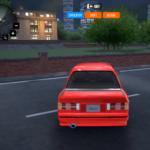
Downtown Cruiser is a 3D car driving game that runs in your browser. You start in a blue car on a city street with traffic and parked cars around you, and you can drive wherever the buildings let you. There is no race and no timer: it is a sandbox for driving, switching camera views and trying different vehicles.
How to play
- Wait for the game to load. It is about 84 MB, so the first load takes a moment.
- Press the Up arrow (or W) to accelerate and the left and right arrow keys to steer.
- Press C to cycle through the camera views: chase view, cockpit view and more.
- Click Options at the top right to spawn a different vehicle, switch the driving assists or pick a handling style.
- Click Customize at the top left to change the wheels, steering and colors of your car.
What you see on screen
- Speedometer: a round gauge at the top left, with the speed in km/h.
- Second gauge: at the top right. In our test its number sat at 1000 when the car stood still and rose to over 5000 when we held the accelerator.
- Menus: Customize at the top left and Options at the top right.
- City: tall buildings, a parking lot with palm trees, a bus and other traffic.
Game features
- A 3D city to drive around, with traffic and parked cars
- A list of 13 vehicles, including a bus, a buggy, a pickup and a truck
- Six camera views on the C key, including a cockpit view
- Five handling styles: Simulator, Racing, Drift, Semi Arcade and Fun
- Four driving assists you can switch: ABS, ESP, TCS and SH
- Customize menu with wheels, steering, config and colors, plus Save and Load
- No sign-up and no ads inside the game
Controls
- Up arrow or W: accelerate
- Left and right arrow keys: steer
- C: change the camera view
- Mouse: click Options, Customize and the buttons inside the menus
Tips
- Press C right after the game loads: the view changes six times before it comes back to the start, and the cockpit view is the second one.
- Open Options and try the handling styles one by one; Simulator is the one selected when the game starts.
- If you get stuck against a wall or a parked car, open Options and use Restart: in our test it put the car back at the start.
- Read our car driving game controls guide for the full list of menus and settings we found.
Frequently asked questions
How do you drive in Downtown Cruiser?
Press the Up arrow (or W) to accelerate and the left and right arrow keys to steer. Press C to change the camera view.
How many vehicles are there?
The spawn list in the Options menu holds 13 vehicles, including a bus, a buggy, a pickup and a truck.
How many camera views are there?
Pressing C cycles through six views, including a cockpit view, and then returns to the start.
What are the driving assists?
The Options menu has four buttons, ABS, ESP, TCS and SH, that you can switch on or off.
Is Downtown Cruiser free?
Yes. It is free to play in your browser on Yes This Game, with no download and no sign-up.
Can I play it on a phone?
No. The game has no touch controls, so on a phone or tablet the page asks you to open it on a computer with a keyboard.
Why does it take a while to load?
The game files add up to about 84 MB, mostly 3D city data, so the first load takes longer than a small game.
Guide: Car Driving Game Controls: 6 Cameras, 5 Modes, 4 Assists
Categories: Driving Original Games