Troubleshooting
Arrow Keys or Space Bar Scroll the Page in a Browser Game? Here Is the Fix
Key takeaways
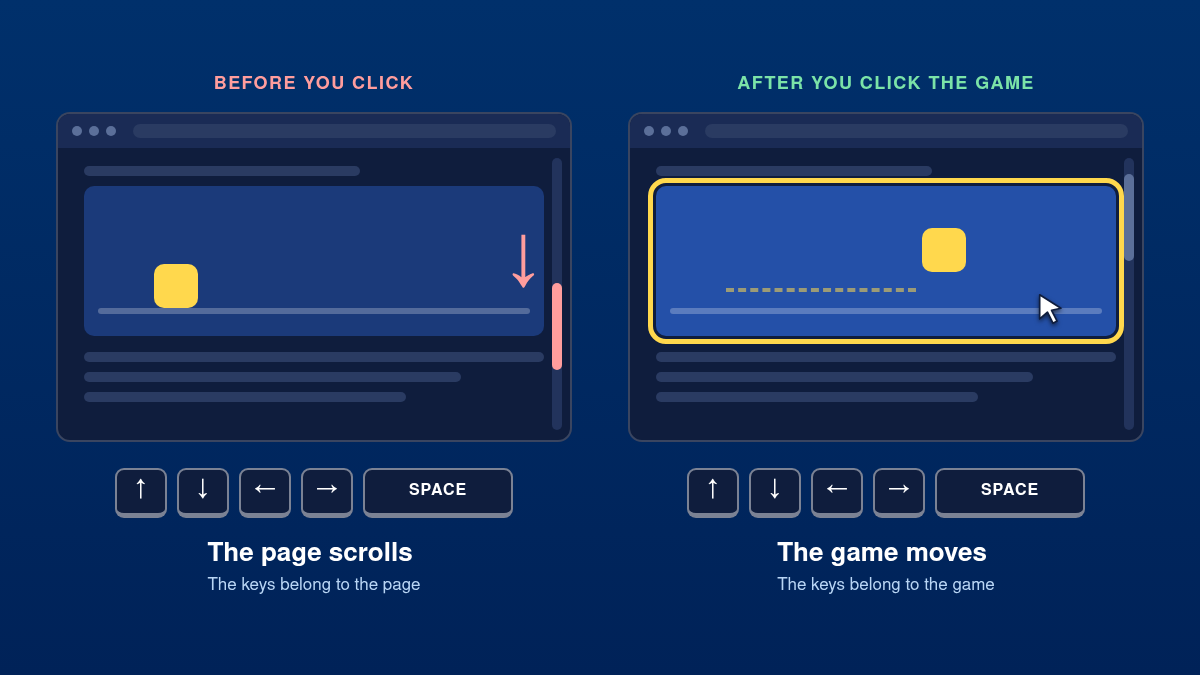
- The page scrolls because the game does not have keyboard focus. Click inside the game once.
- If it still scrolls, use the game's fullscreen button. In fullscreen there is no page left to scroll.
- In Chrome one Down arrow press scrolls 40 pixels and one Space press scrolls 87.5% of the window.
- Developers fix it with preventDefault() for the game keys, a focusable canvas and, for framed games, key forwarding from the outer page.
If the arrow keys or the space bar scroll the page instead of controlling your game, the game does not have keyboard focus. Click once inside the game and try again. If the page still moves, switch the game to fullscreen. Anything beyond that is a fault in the game itself, and the last part of this guide shows developers how to fix it.
The 10-second fix
- Click inside the game. Click the game picture itself, not a button or a banner next to it.
- Press the keys again. In most games they now reach the game and the page stays still.
- Still scrolling? Go fullscreen. Use the game’s fullscreen button. In fullscreen there is no page left to scroll.
Why arrow keys and Space scroll the page
Browsers give some keys a built-in job. The arrow keys scroll by a few lines, and the space bar scrolls down by almost a full screen. These jobs exist so that people can read a page without a mouse, and the browser keeps doing them unless something on the page says otherwise.
The second half of the explanation is keyboard focus. Only one thing on a page has focus at a time, and every key you press goes to that thing. A browser game usually sits in a frame, a small page inside the page. Until you click it, focus belongs to the outer page, so the outer page gets your keys and does what it always does with them: it scrolls.
| Key | Built-in job | Measured |
|---|---|---|
| Down arrow, Up arrow | Scroll a few lines | 40 pixels per press |
| Space | Scroll down almost one screen | 672 pixels, 87.5% of the window |
| Shift + Space | Scroll up almost one screen | 672 pixels back |
| Page Down, Page Up | Same as Space and Shift + Space | 672 pixels |
| End, Home | Jump to the bottom or top | The whole page |
| Space on a selected button | Press that button | No scrolling |
That is why Space is the worst offender in jumping games. One press throws the game almost a full screen out of view.
What we measured with an embedded game
We build browser games, so we tested the three situations a player can be in. A test page held a game in a frame, and we pressed the Down arrow and Space in each case.
| Situation | Did the game get the key? | Did the page scroll? |
|---|---|---|
| Game not clicked yet | No | Yes. 40 pixels per Down arrow, 672 per Space |
| Game clicked, game does not block the keys | Yes | Down arrow: yes, 40 pixels. Space: no |
| Game clicked, game blocks the keys | Yes | No |
Two things follow. Before the click, nothing the game does can help, because the game never sees the key. After the click, a well-made game stops the scrolling completely. A game that forgets to block the keys still receives them, but the Down arrow leaks through and moves the page as well.
More fixes for players
- Use fullscreen for keyboard games. It is the one fix that works even when the game itself is at fault.
- Zoom out until the page fits. Press Ctrl and - (on a Mac Cmd and -). A page that fits in the window cannot scroll.
- Try W, A, S and D. Many games accept them instead of the arrows. Letters have no scrolling job in the browser.
- Space presses a button instead? A button you clicked earlier, such as Play or Mute, still has focus. Click an empty part of the game.
- Arrow keys move a text cursor around the page? Caret browsing is on. Press F7 to turn it off.
- Check your extensions. Extensions that add keyboard shortcuts to every page can take the keys before the game does. Turn them off for the games site.
If this happens in Excel and not in a game, the cause is different. There the arrow keys scroll the sheet when Scroll Lock is on. Turn Scroll Lock off and they move from cell to cell again.
How we handle it on Yes This Game
On our game pages you do not have to click first. While a game is on screen, the page catches the arrow keys and Space, hands them to the game and moves keyboard focus into it. The games we make ourselves, such as Temple Explorer Adventure and Lets Car Drift Games, also block the browser’s scrolling while you play.
Games from other publishers run their own code. We can give them focus, but what they do with a key is up to them. For those games, fullscreen is the reliable fix.
Looking for games that are made for the keyboard? Our list of browser games with no download gives the keys for each one.
The fix for developers
Three small pieces of code solve the problem for good.
1. Block the built-in job while the game is running
Call preventDefault() for the keys your game uses, and only for those.
const GAME_KEYS = new Set(['ArrowUp', 'ArrowDown', 'ArrowLeft', 'ArrowRight', ' ']);

window.addEventListener('keydown', function (event) {
  if (event.ctrlKey || event.metaKey || event.altKey) { return; }
  if (GAME_KEYS.has(event.key) && gameIsRunning()) {
    event.preventDefault();          // the page no longer scrolls
  }
  handleGameKey(event.key);
});
2. Take focus when the player starts
A canvas cannot receive focus unless you allow it. Give it a tabindex and focus it on the first click or tap.
<canvas id="game" tabindex="0"></canvas>

canvas.addEventListener('pointerdown', function () {
  canvas.focus({ preventScroll: true });
});
3. If the game sits in a frame, help from the outer page
The outer page gets the keys until the frame has focus. Catch them there, pass them on and move focus into the frame.
document.addEventListener('keydown', function (event) {
  if (!GAME_KEYS.has(event.key)) { return; }
  if (event.ctrlKey || event.metaKey || event.altKey) { return; }
  if (event.target.closest('input, textarea, select, [contenteditable]')) { return; }
  if (!frameIsOnScreen(frame)) { return; }

  event.preventDefault();
  // for a game hosted on another site, use that site's origin here
  frame.contentWindow.postMessage({ type: 'key', key: event.key }, location.origin);
  frame.focus({ preventScroll: true });
});

// inside the game
window.addEventListener('message', function (event) {
  if (event.origin !== location.origin) { return; }
  if (event.data && event.data.type === 'key') { handleGameKey(event.data.key); }
});
Keep three limits in mind. Never block Tab, because keyboard users must be able to leave the game (the accessibility rule is called No Keyboard Trap). Never block shortcuts that use Ctrl, Alt or Cmd. And stop blocking when the game is paused or scrolled out of view, so the page behaves normally again.
On phones the same fault shows up as the page sliding or reloading when you swipe inside a game. The cure is similar: block touchmove with a non-passive listener while the game is in play, and set overscroll-behavior: none on the page.
Frequently asked questions
Why does the space bar scroll down the page?
Scrolling down by almost one screen is the space bar’s built-in job in every browser. It happens whenever the page, and not the game, has keyboard focus. Click inside the game so that the key goes to the game instead.
How do I stop the arrow keys from scrolling in Chrome?
Chrome has no setting that turns off scrolling with the arrow keys. In a game, click inside the game or switch it to fullscreen. On an ordinary page, the keys scroll only while the page can scroll, so zooming out until it fits also stops it.
Why does the game work after I click it?
The click moves keyboard focus from the page into the game. Keys always go to whatever has focus, so from then on the game receives them.
Why do the W, A, S and D keys not scroll the page?
Letter keys have no scrolling job in the browser, so nothing visible happens when the page gets them. They still reach the game only after it has focus.
Does this also happen on Chromebooks and Macs?
Yes. The behavior belongs to the browser, not to the operating system, so it is the same in Chrome, Edge, Firefox and Safari on any computer.
The arrow keys scroll my Excel sheet instead of moving between cells. Is that the same problem?
No. In Excel the cause is Scroll Lock. Turn Scroll Lock off and the arrow keys move from cell to cell again.