More games






About Hullstride
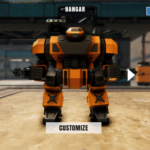
Hullstride is a 3D robot shooter seen from inside the cockpit. You start in a hangar with an orange and black war robot and press START MISSION to look out over a sunlit desert base.
How to play
- Look at the robot in the hangar; press CUSTOMIZE to see its arm weapons up close.
- Press START MISSION at the top right.
- Click inside the game once; the view then points at the ground.
- Hold the left mouse button to fire; shots land with a flash and sparks.
- Read the OBJECTIVES line at the top left and keep an eye on the radar box at the top right.
What you see on screen
- Hangar: the robot, a HANGAR title, START MISSION at the top right and CUSTOMIZE at the bottom.
- Customize: a close-up of an arm weapon with MODULES and MODULE MOUNTS panels.
- Mission: cockpit windows, a reticle, arm icons with a bar at the bottom corners and a radar box.
- After a while: red laser lines cross the view.
Tips
- Click inside the game before you fire. In our tests no shot landed until we had clicked first.
- Hold the button. A 3-second hold gave an impact flash in all three runs.
- Be patient at the start. The game is large and the first load is slow.
- Read our mech shooter game tips for the numbers behind these tips.
Frequently asked questions
How do I fire in Hullstride?
Click inside the game once, then hold the left mouse button.
What does the customize screen show?
A close-up of an arm weapon with MODULES and MODULE MOUNTS panels.
Why is the first load slow?
The whole desert base is stored in the extension, so the game is large.
Can I play on a phone?
The game is made for a mouse and a wide screen, so it plays best on a computer.
Is Hullstride free to play?
Yes. You can play it in your browser on Yes This Game with no download and no sign-up.
Guide: Mech Shooter Game Tips: Click First, Then Hold to Fire
Categories: Shooting Original Games