Shooting guide
Mech Shooting Game Controls: Hangar, Modules, Cockpit
Key takeaways
- The hangar has 2 mechs, and the Customize screen shows a list of 5 modules and 4 mounts.
- In the mission, the mouse aims, W moves forward and the left mouse button fires.
- The only goal on screen is Destroy all targets, with a radar at the top right.
- The game is about 81 MB, mostly 3D data, and it needs a keyboard and a mouse.
The main mech shooting game controls in Rustwalker are the mouse to aim, W to move forward and the left mouse button to fire, and before the mission the hangar offers 2 mechs and a Customize screen with 5 modules and 4 mounts. We opened every screen and wrote down what we found.
The hangar
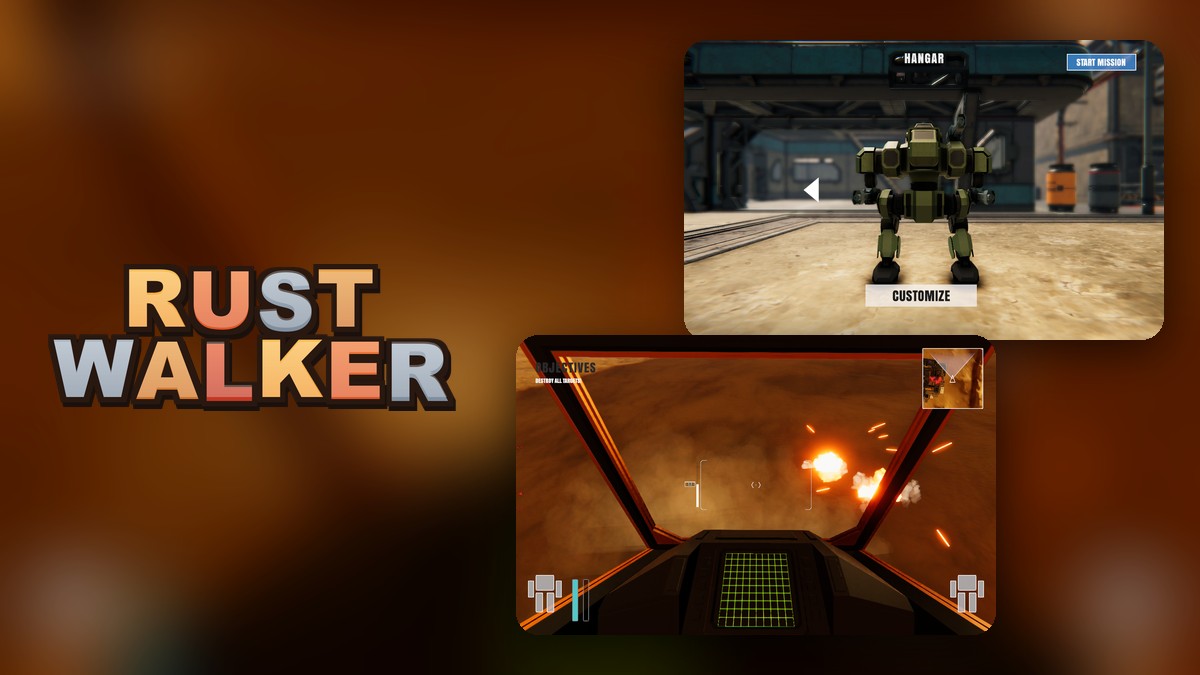
The game starts with a short Made with Unity screen and then the hangar: a mech stands on a sandy floor under a steel roof, with Customize at the bottom and Start Mission at the top right. A white arrow next to the mech switches to the other one. We clicked it and found two mechs, an orange one and a green one. More clicks did not bring another mech, so the hangar holds two.
The Customize screen
Click Customize and the camera moves close to the mech. A list called Modules appears on the left and a list called Module Mounts on the right.
| Part | What it shows | Rows |
|---|---|---|
| Modules | A list of weapon-style modules, each with a small icon | 5 |
| Module Mounts | Places on the mech where a module can be fitted | 4 |
| Buttons | Clear Mount, Equip and Vehicle | 3 |
We counted the rows on screen. We selected the modules one by one and each one showed a different weapon on the mech, but we did not measure any weapon’s damage.
The mission
Click Start Mission and you see the world from inside the cockpit: the dark frame of the cockpit, a green grid screen at the bottom and a mech icon in each bottom corner. The text at the top left reads Objectives and Destroy all targets. A small radar sits at the top right. Moving the mouse turned the view, pressing W moved us closer to the buildings of the base, and holding the left mouse button fired: in a sweep of about 20 seconds we saw fireballs with orange sparks where the shots landed, and an orange tracer line coming from the distance while we stood still.
The game’s input settings list more keys than we tested: A, S and D and the arrow keys for moving, Space, Q and E, right mouse and Shift. We only confirmed W, the mouse and the left button.
What is in the download
The game is about 81 MB, which is large for a browser game. Most of it is 3D data for the base and the mechs.
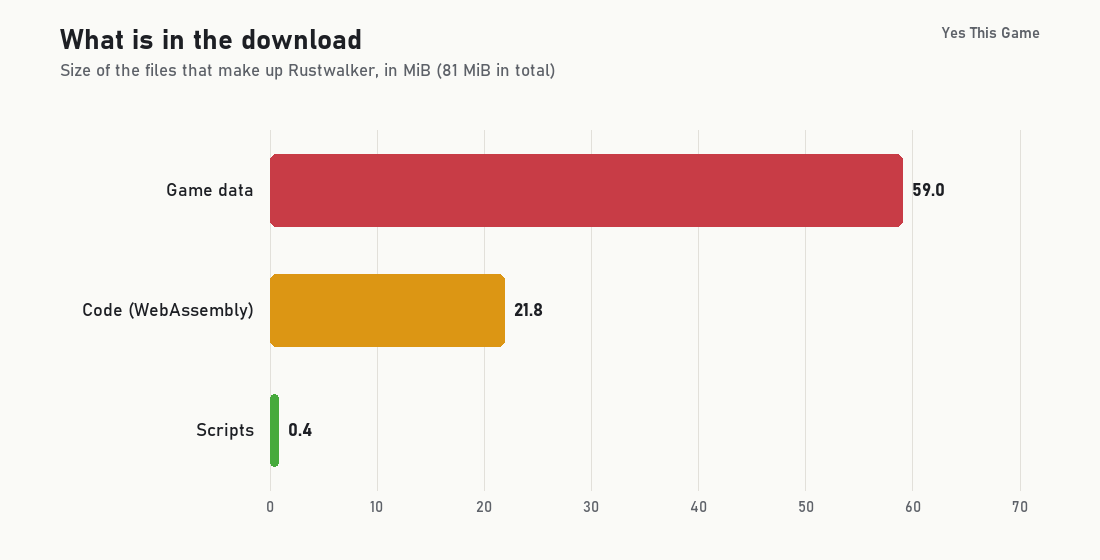
If it loads slowly the first time, that is the size at work; the next visit can reuse files the browser has kept.
4 tips from the screens
- Check Customize first. It takes a few clicks and the mech changes on screen.
- Look around before you move. The base and the open desert are in different directions.
- Keep an eye on the radar. It is the only map the game gives you.
- Have a keyboard and a mouse ready. The game has no touch controls.
Where to try it
Try it yourself in Rustwalker. For a driving game with a Customize menu of its own, Downtown Cruiser opens a 3D city, and Apex Drift Garage is a drifting game.
Frequently asked questions
How do you shoot in Rustwalker?
Click the left mouse button. In our test, each shot that landed showed a fireball with sparks.
How do you move?
Press W to move forward and use the mouse to aim. The game’s input settings also list A, S and D and the arrow keys; we confirmed W.
How many mechs can you choose from?
Two: an orange one and a green one. Click the arrow next to the mech in the hangar to switch.
What does the Customize screen offer?
A list of 5 modules and 4 module mounts with an Equip button. Picking a module changes the weapon shown on the mech.
What is the goal of the mission?
The text on screen says Destroy all targets. A radar at the top right shows the area around you.
Can I play it on a phone?
No. It has no touch controls, so it needs a computer with a keyboard and a mouse.